GamingMonitor
A downloadable tool for Windows
You know the drill: you're mid-cutscene (or dinner), controller down - and Windows decides it's nap time.
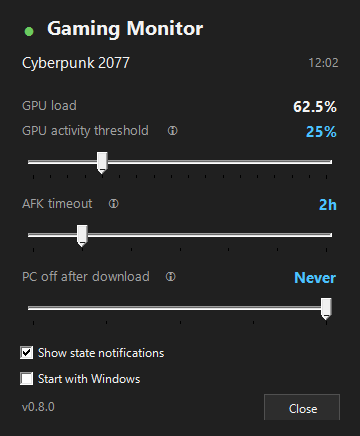
GamingMonitor is a tiny tray utility that actually pays attention:
🎮 Gaming mode — gamepad input (DualSense, Xbox, other HID pads) or GPU load keeps both the display and the system awake
📥 Downloading mode — Steam/Xbox downloads block sleep (display may rest)
🌙 Optionally shuts the PC down after downloads finish (grace period, any input cancels)
😴 Idle — hands everything back to Windows
⏱️ AFK timer — hours of silence force-release Gaming, even mid-render
🔄 Self-updates from GitHub in one click
Dark flyout with live GPU load, per-state tray icon dot, toast notifications, zero config to start. Free, open source (MIT),
~70 MB self-contained download, no install, no .NET needed.
Source code & updates: https://github.com/dms137/gamingMonitor
Download
Install instructions
1. Download and unzip the file, preserving folders. No installation needed — the app is portable.
2. Run GamingMonitor.exe.
3. (Optional) Tick "Start with Windows" in the settings flyout (left-click the tray icon).
No .NET runtime required. Windows 10 1709+ / 11.
If SmartScreen warns: More info → Run anyway.
Leave a comment
Log in with itch.io to leave a comment.